


How Do You Organise a POS Station for Maximum Efficiency?
Bernard ColganLast Updated: October 25, 2026
Quick Summary
To organise a POS station for maximum efficiency, put the till, card reader and receipt printer inside one arm's reach of the person serving, with the card reader on the customer's side. Keep one spare roll under the printer and a full box per till close by. Move refunds, click and collect and anything slow away from the counter.
- Card reader on the customer's side, printer beside the till with the paper exit facing staff.
- Pick the layout that fits your counter: straight run, L-shape or two-sided island.
- One open spare roll under the printer, one full box per till, backup stock sealed and labelled.
- Order before 1pm and it ships at 2pm the same day from DiscountTillRolls.ie in Dublin 12.
Table of Contents
- How do you organise a POS station for maximum efficiency?
- Where should the till, card reader and printer go?
- Which counter layout suits your business?
- Where should spare rolls live at the station?
- What should stay off the counter at busy times?
- How do you keep the station organised every shift?
- Which rolls should you stock at the station?
- Frequently Asked Questions
How do you organise a POS station for maximum efficiency?
You organise a POS station by putting everything staff touch on every sale (till, card reader, receipt printer, spare roll) inside one arm's reach, and moving everything else away from the counter. A POS station is the till point itself: the screen, the card machine, the printer and the bit of counter around them.
Get that right and you lose the small stalls that build a queue: the stretch for the card machine, the walk to the back for a roll, the refund that holds up four customers. Below is how we'd set one up, based on what we hear from bars, cafés, restaurants and shops ringing us for rolls since 2007.
This guide is about the layout. For the full list of paper and labels a till needs, see our POS system supplies checklist.
Where should the till, card reader and printer go?
The till goes in front of the person serving, screen tilted up and angled slightly toward the customer. The card reader goes on the customer's side so they can tap without anyone passing it over. The receipt printer sits beside the till, paper exit facing staff, so a receipt can be torn off without turning around.
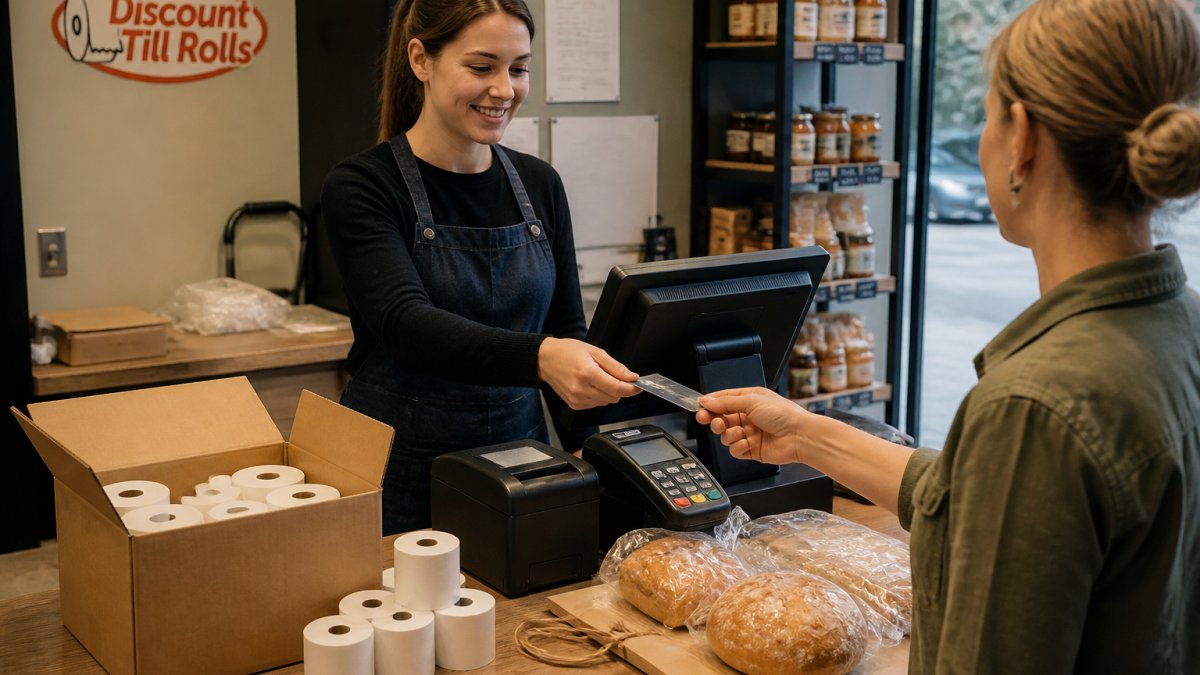
- Till: straight in front of staff, screen visible to them and not to the queue.
- Card reader: customer side, on a fixed spot or bracket, cable routed away from bags and baskets.
- Receipt printer: beside the till, not in front of the cash drawer, with room to open the lid.
- Spare roll: under the printer, never on the floor.
Clip or tape down every cable. A pulled plug stops the till dead. If the printer jams or prints faint during service, our paper jam troubleshooting guide covers the quick fixes.
Which counter layout suits your business?
Three layouts cover most counters. A straight run suits narrow counters and kiosks, an L-shape suits small shops and cafés with a short return, and a two-sided island suits bars and busy counters served from both sides. Pick the one that matches your counter, not one copied from a shop twice your size.
Layout |
How it's set up |
Best for |
|---|---|---|
Straight run |
Till, printer and card reader in one line, spare rolls under the printer |
Narrow counters, kiosks, coffee hatches |
L-shape |
Till on the long side, printer and bagging on the short side |
Small shops, delis, cafés |
Two-sided island |
Till in the middle, card reader facing out, spare rolls on both sides |
Bars and counters served from both sides |
Set it up, watch a busy shift, then move what people keep reaching for.
Where should spare rolls live at the station?
Keep one open spare roll under the printer and at least one full box per till within a step of the counter. Backup boxes stay sealed in a cool, dry spot away from the kitchen pass, radiators and sunny windows, labelled by size so nobody grabs a 57mm roll for an 80mm printer.
- Label every box with width x diameter in mm, for example 80x80mm or 57x40mm.
- Card machine rolls get their own box, separate from till rolls.
- Older boxes to the front, so they get used first.
Heat and damp are what damage thermal paper in storage. More on that in why thermal paper fades quickly. Not sure how much to keep? Work it out with our guide on calculating thermal paper usage.
What should stay off the counter at busy times?
Anything that takes longer than a normal sale. Refunds, queries, click and collect bagging and stock counts all hold up the queue if they happen at the till. Give them a separate spot, even a corner of the counter, and keep the main till for taking money.
- Bag click and collect or phone orders before the rush.
- Handle refunds and exchanges at a second point.
- Open a second till before the queue builds, not after.
- Nobody leaves the till to fetch paper. That's what the spare under the printer is for.
How do you keep the station organised every shift?
Give one person the job at opening and closing. At opening: test-print a receipt, check the card reader is charged and connected, and check the spare roll is there. At closing: clear waste paper, note anything running low and restock the spare. It takes a couple of minutes.
For a fuller maintenance routine, see how to reduce POS system downtime. For the print head, follow how to clean POS receipt printer heads.
Which rolls should you stock at the station?
Stock the exact roll your printer and card machine take, measured as width x diameter in mm. Most EPOS receipt printers take 80mm wide rolls and most card machines in Ireland take 57mm wide rolls, but the diameter varies by model. Check our till roll size chart or ring us.
Roll |
Box |
Price |
Per roll |
|---|---|---|---|
20 rolls |
€36.99 + VAT |
about €1.85 + VAT |
|
20 rolls |
€19.99 + VAT |
about €1.00 + VAT |
|
50 rolls |
€27.75 + VAT |
about 56c + VAT |
|
100 pads |
€69.95 + VAT |
about 70c + VAT per pad |
If your printer takes 80mm wide rolls with an 80mm diameter, the 80x80mm 80gsm long life rolls are the ones we'd put at a busy till: 80gsm paper and a bigger roll than 80x70mm, so fewer changes mid-shift, and rated for 10-year archive life. The full range is in our thermal till rolls collection and credit card rolls collection.


Order before 1pm and it ships at 2pm the same day. DiscountTillRolls.ie has supplied Irish bars, restaurants, hotels and shops since 2007 from Unit 4, Naas Road Ind. Park, Dublin 12. Not sure what fits your till? Ring us on 01 443 3964 or email Sales@discounttillrolls.ie and a real person will sort it.
Frequently Asked Questions
Which side of the counter should the card reader go on?
The customer's side. Put it on a fixed spot or bracket within easy reach of the customer, so they can tap or insert their card without staff passing the machine over the counter. Route the cable away from where bags and baskets land, and keep the reader in the same place every shift so nobody has to look for it.
How close should spare till rolls be to the till?
Close enough that staff can change a roll without leaving the customer. Keep one open spare roll directly under the printer and a full box per till within a step of the counter. Backup boxes stay sealed in a cool, dry spot, labelled by size, so whoever is on shift grabs the right roll first time.
How do you organise a POS station in a small shop or bar?
Use a straight run or L-shape and keep one clear zone for the customer. Fix the card reader on the customer's side, put the printer beside the till rather than in front of the cash drawer, and use the space under the counter: one box for till rolls, one for card machine rolls. Keep refunds and stock counts away from the till.
How many spare rolls should each till have?
At least one full box per till, plus an open spare under the printer. Busy bars, cafés and restaurants should order ahead of weekends and bank holidays. DiscountTillRolls.ie ships orders placed before 1pm at 2pm the same day from Dublin 12, so restocking is quick once you know what you use each month.
How do I know which roll size my till takes?
Measure the roll you have now as width x diameter in mm, for example 80x80mm or 57x40mm. Most EPOS receipt printers take 80mm wide rolls and most card machines in Ireland take 57mm wide rolls, but diameters vary by model. Check the till roll size chart, or ring DiscountTillRolls.ie on 01 443 3964 with your printer model.
