


How to Prevent Receipt Printer Ghosting on Busy Days
Bernard ColganLast Updated: October 23, 2026
Quick Summary
To prevent receipt printer ghosting on busy days, swap in a fresh roll first, then turn print density down one step. Clean the print head and platen roller before the rush, not during it, and keep spare rolls sealed and away from heat. If ghosting keeps coming back after that, the head may be worn.
- Ghosting is a faint second copy of the print, usually caused by paper, dirt, settings or a worn head.
- Check the roll before you touch the settings.
- Clean the head with the printer off and cooled down.
- Put a sealed box of spare rolls at the till before a busy day.
- Not sure which roll fits your printer? Ring us on 01 443 3964.
Table of Contents
- What Is Receipt Printer Ghosting?
- Why Does Ghosting Get Worse on Busy Days?
- What Should You Check First When Receipts Start Ghosting?
- Which Printer Settings Reduce Ghosting?
- How Often Should You Clean the Print Head?
- How Should You Store Till Rolls So They Don't Cause Ghosting?
- What Should Be on Your Busy-Day Printer Checklist?
- Which Till Rolls Help Prevent Ghosting?
- How Do You Order Till Rolls From DiscountTillRolls.ie?
- Frequently Asked Questions
What Is Receipt Printer Ghosting?
Receipt printer ghosting is a faint shadow or second copy of the text on a thermal receipt. It tends to show up on your busiest days, when the printer is working hardest. The cause is nearly always one of four things:
- Tired paper: damp, old or badly stored rolls react unevenly to heat.
- Dirty contact: dust and coating residue on the head or platen roller stop the paper sitting evenly against the head.
- Settings pushed too high: density turned up to darken pale receipts.
- A worn head: if a fresh roll and a clean don't fix it, the head itself may be on its way out.
Why Does Ghosting Get Worse on Busy Days?
A quiet Tuesday can hide all of these. A Saturday lunch rush won't. Long runs of back-to-back receipts give the head no rest, and any build-up from the week shows up at the worst time.
Staff are also more likely to grab whatever roll is nearest when the queue is out the door, including one that's been sitting beside the coffee machine or under a hot counter. And nobody stops to clean a printer mid-rush. That's why the fix is mostly about what you do before a busy day, not during it.
What Should You Check First When Receipts Start Ghosting?
Check the roll before the printer. Damp or old paper can look exactly like a printer fault.
- Is the roll damp, curled or discoloured at the edge?
- Is the print side facing the head? Thermal paper only prints on one side. Our guide to receipt printers printing blank or faint shows how to check.
- Is it the right width and diameter for your printer? If you're not sure, see Which Till Roll Do I Need?.
- Swap in a fresh roll from a sealed box and print a test receipt.
If the ghosting clears, it was the paper. If it stays, move on to the settings.
Which Printer Settings Reduce Ghosting?
Most POS printers let you change print density, and some let you change speed too. Ghosting often starts when density has been turned up to darken pale receipts.
- Turn density down one step and print a test receipt.
- If your printer allows it, drop the speed one step.
- Change one setting at a time and test after each change.
- Keep the lowest setting that still gives clean, dark text.
Where these settings live depends on your printer. Check the manual or your POS provider's support page.
How Often Should You Clean the Print Head?
Clean the print head and platen roller once a week, and again the morning before a big day. Do it with the printer off and the head cooled down. Use an isopropyl alcohol wipe, a cleaning pen or a lint-free swab. Never anything sharp, and never a wet cloth.
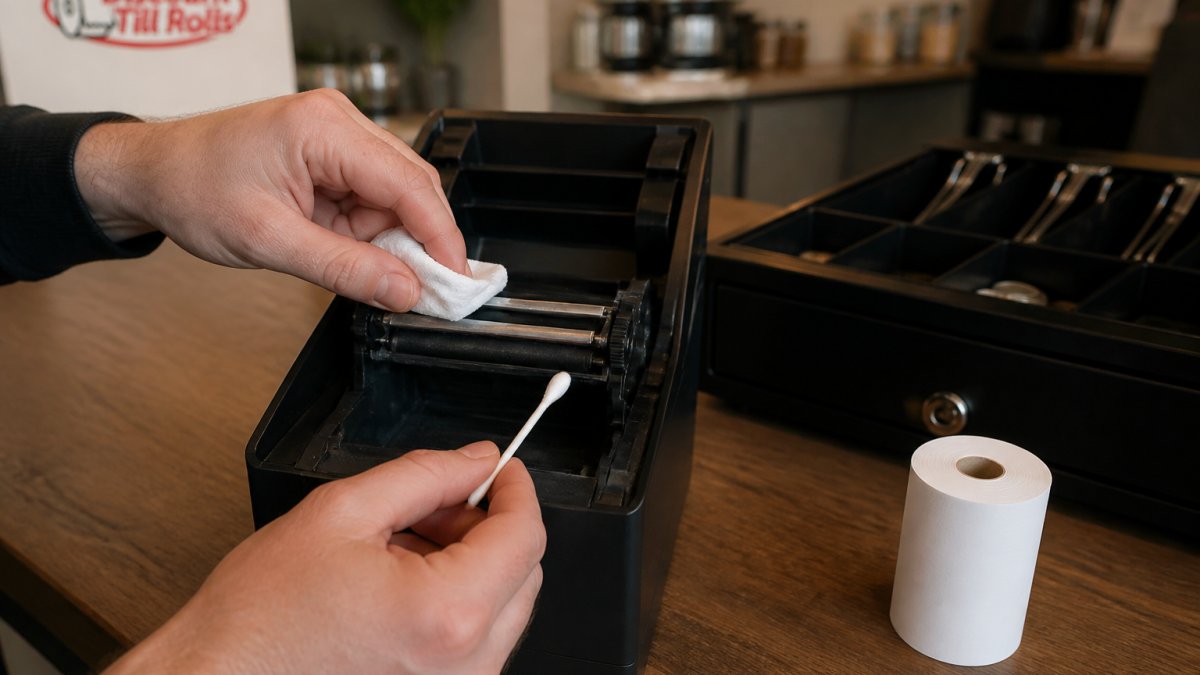
We cover the full step-by-step, what to use and what to avoid in our guide on how to clean POS receipt printer heads.
How Should You Store Till Rolls So They Don't Cause Ghosting?
Keep rolls in their sealed box until you need them, somewhere cool and dry. Not beside the fryer, the coffee machine or a radiator, and not in a sunny window. Use older stock first. Heat and damp damage the coating before a roll ever reaches the printer.
For more on what heat, light and damp do to thermal paper, see why thermal paper fades quickly.
What Should Be on Your Busy-Day Printer Checklist?
Run this weekly, and again before any big day: a bank holiday weekend, a match day, the Christmas run.
Task |
When |
Why |
|---|---|---|
Clean print head and platen roller |
Weekly, and the morning before a big day |
Removes the build-up that causes ghosting |
Put a sealed box of spare rolls at the till |
Before every busy shift |
Nobody grabs a damp roll from the back |
Print a test receipt |
Start of every shift |
Catches ghosting before customers see it |
Check density and speed settings |
Monthly |
Stops settings creeping up |
Look at the head for scratches or wear |
Monthly |
Spots a worn head before it fails |
Which Till Rolls Help Prevent Ghosting?
Good paper won't fix a dirty head, but old or badly stored paper makes everything worse. Start with the right size for your printer, then buy rolls that are fresh and kept well.
Roll |
Pack |
Price |
Per roll |
|---|---|---|---|
Box of 20 |
€36.99 + VAT |
about €1.85 + VAT |
|
Box of 50 |
€27.75 + VAT |
about 56c + VAT |
For most 80mm receipt printers, the 80x80mm 80gsm long life roll is the one we'd recommend. Browse every size in Thermal Till Rolls, or go straight to the 80mm or 57mm collections.
If you need phenol-free paper, see our Phenol Free Thermal Paper Rolls. BPA-free and phenol-free are not the same thing, and our guide Is Receipt Paper BPA-Free in Ireland? explains the difference.
How Do You Order Till Rolls From DiscountTillRolls.ie?
Order online before 1pm and it's shipped at 2pm the same day. You can also ring us on 01 443 3964, or call and collect from Unit 4, Naas Road Ind. Park, Dublin 12.
DiscountTillRolls.ie has been supplying Irish shops, bars, restaurants and hotels since 2007. If you're not sure which roll fits your printer, ring us and we'll tell you.
Frequently Asked Questions
What causes ghosting on thermal receipts?
Ghosting is usually caused by dirt or coating residue on the print head or platen roller, damp or old paper, or print density set too high. A worn print head can cause it too. It shows up most on busy days because the printer runs for longer with no break. Start with a fresh roll, then clean the head, then turn density down.
Can a dirty print head cause receipt printer ghosting?
Yes. Dust and coating residue on the head or platen roller stop the paper sitting evenly against the head, which can leave a faint second image. Clean it with the printer off and cooled down, using an isopropyl alcohol wipe, a cleaning pen or a lint-free swab. If ghosting comes back within days, the head may be worn.
Will turning up print density fix pale receipts?
Usually not. Pale receipts are more often down to old or badly stored paper, a dirty head or a roll loaded the wrong way round. Turning density up can cause ghosting instead. Fix the paper and the cleaning first, and keep density at the lowest setting that still gives clean text.
How should I store till rolls to protect print quality?
Keep rolls in their sealed box, somewhere cool and dry, away from fryers, coffee machines, radiators and sunny windows. Use older stock first. Heat and damp damage the thermal coating before the roll ever reaches the printer.
What should I do if ghosting starts mid-shift?
Swap in a fresh roll from a sealed box and print a test receipt. If that clears it, carry on and set the old roll aside. If it doesn't, turn density down one step. Clean the print head once the rush is over and the printer has cooled down. Need spare rolls fast? Order before 1pm and they're shipped at 2pm, or ring us on 01 443 3964.
